WISDOMBYDATA
  • BLOG
    • Blog Guide
    • Blog History
  • EXCEL
    • Functions & Formulas
    • VBA & Macros
    • VLOOKUP
    • Pivot Tables
    • Conditional Formatting
    • Tricks & Shortcuts
  • BI
    • SAP BOBJ/BW
    • Tableau
  • SQL
  • ABOUT
    • About WBD
    • About Me

Normalization Explained

2/2/2014

0 Comments

 
Normalization is part of the process of designing database structures in a relational database. The point of normalization is to reduce duplicate information and avoid anomalies (i.e. insert, update and delete anomalies). In this post, I want to explain the three main normalization forms using a real table. But first, I will provide a brief overview of the three main normal forms.

First Normal Form (1NF): 
 >All non-key attributes must depend on the key 
             >Without repeating or nested groups 

Second Normal Form (2NF): 
>All non-key attributes must depend on the whole key (not just part of it) 
              >Partial functional dependencies must be removed into separate tables
​
Third Normal Form (3NF):
>All non-key attributes must depend on nothing but the key 
              >Transitive dependencies must be removed into separate tables
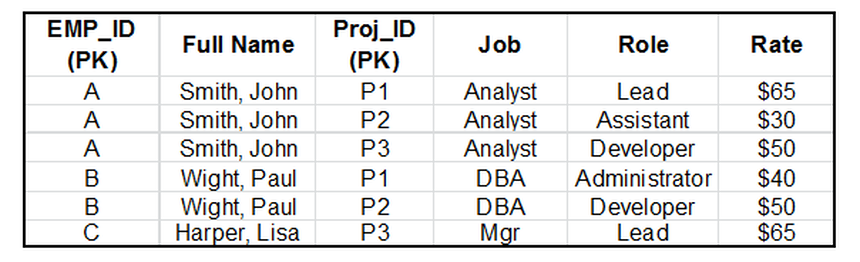
I will hereby apply these three normal forms to the table below.
Picture
Explanation: To arrive at 1NF all non-key attributes must depend on the key, so we  should remove all repeating or nested groups. we can tell from the table above that EMP_ID and Proj_ID are the key attributes becasue every employee requires an EMP_ID and every employee must be associated with at least one project.

In the table above some employees are involved in more than one project. Notice that in order to take this table to 1NF, I have placed each project in a seperate row along with the role and rate associated with that project for each employee. The table below is in the First Normal Form.
Picture
Picture
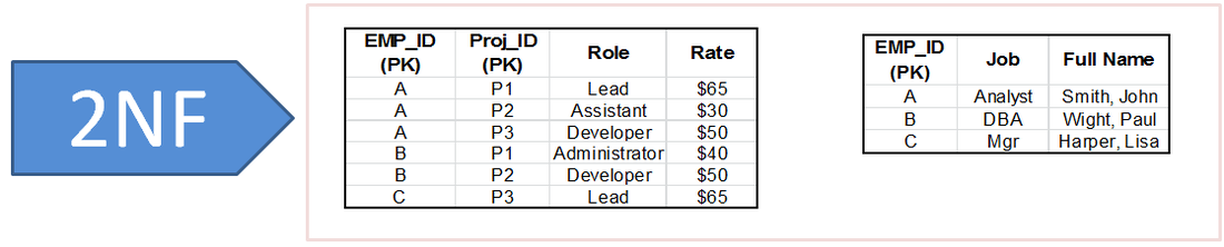
Explanation: To arrive at 2NF all non-key attributes must depend on the whole key (not just part of it). note that 2NF must only be applied to those tables where the key is more than one column.

To go into 2NF we identify all of the functional dependencies and then remove all partial functional dependencies into seperate tables. For the table above to go into 2NF, the Job and Full Name columns must be moved into a seperate table. The illustration below shows our data in the Second Normal Form.
Picture
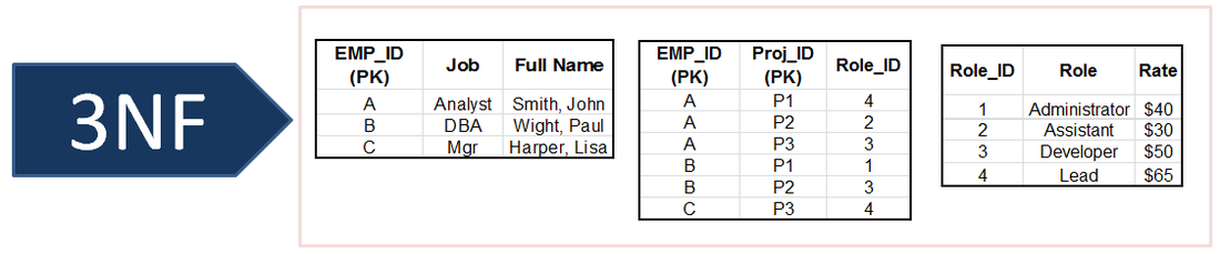
Explanation: To arrive at 3NF all non-key attributes must depend on nothing but the key, and transitive dependencies must be removed. In the two tables above (i.e . in 2NF ) ,EMP_ID and Proj_ID determine the role and role determines the rate, and this is a transitive dependecy. This menas that while role directly determines the rate, EMP_ID and Proj_ID also determine the rate.

To get rid of this transitive dependency, I have created a seperate table for Role and Rate and created a new primary key for that table (i.e Role_ID) which is reflected in other tables where the role column exists. The tables below  illustrate the data in theThird Normal Form.
Picture
0 Comments


Leave a Reply.

    Categories

    All
    BI
    EXCEL
    MISC
    SQL

    Archives

    June 2020
    May 2020
    April 2020
    March 2020
    February 2020
    December 2019
    November 2019
    October 2019
    September 2019
    August 2019
    July 2019
    June 2019
    May 2019
    April 2019
    March 2019
    February 2019
    January 2019
    December 2018
    November 2018
    October 2018
    September 2018
    August 2018
    July 2018
    June 2018
    May 2018
    April 2018
    March 2018
    September 2017
    August 2017
    July 2017
    June 2017
    May 2017
    April 2017
    March 2017
    February 2017
    January 2017
    December 2016
    November 2016
    October 2016
    September 2016
    August 2016
    July 2016
    June 2016
    May 2016
    April 2016
    March 2016
    February 2016
    May 2015
    April 2015
    March 2015
    February 2015
    January 2015
    December 2014
    November 2014
    October 2014
    September 2014
    August 2014
    April 2014
    March 2014
    February 2014
    January 2014
    December 2013
    November 2013

Powered by Create your own unique website with customizable templates.
  • BLOG
    • Blog Guide
    • Blog History
  • EXCEL
    • Functions & Formulas
    • VBA & Macros
    • VLOOKUP
    • Pivot Tables
    • Conditional Formatting
    • Tricks & Shortcuts
  • BI
    • SAP BOBJ/BW
    • Tableau
  • SQL
  • ABOUT
    • About WBD
    • About Me